


Bus Fever Party! review
 Analysis by GetAllApps
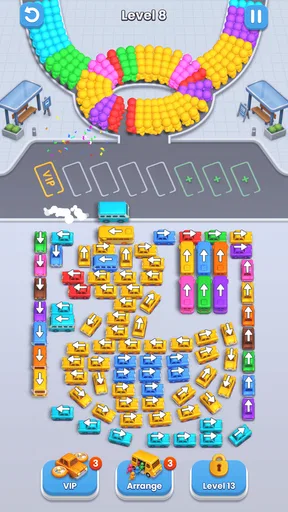
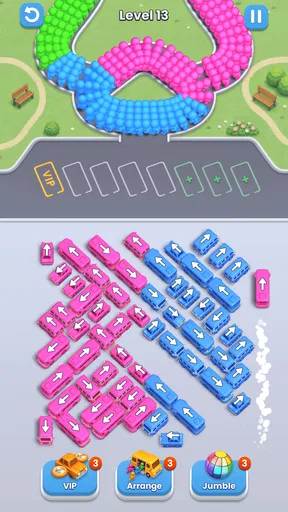
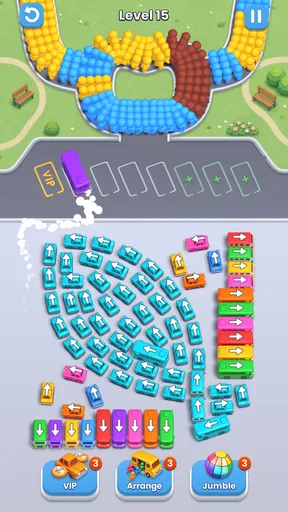
I like casual games that give me a small problem to solve without asking for a long session, and Bus Fever Party! is built around that kind of moment. Its premise is a crowded bus area where the challenge is to work out how to clear the traffic and get the bus moving. The appeal is less about speed than about looking at a tangle of vehicles, deciding what can move first, and adjusting when an apparently simple route is blocked.
Reading the traffic before making a move
The first place I expect players to get stuck is not in understanding the goal, but in spotting the order of moves. When several vehicles occupy the same tight space, the obvious bus may not be the first one that can leave. I find it helps to pause briefly and trace the open path rather than tapping quickly at whichever vehicle looks closest to the exit. A move that clears one lane can also create room for another vehicle, so the useful question is not only “Can this one move?” but “What does moving it make possible?”
That makes the game a better fit for players who enjoy parking and traffic puzzles than for anyone expecting a conventional bus-driving game. The satisfaction comes from arranging a route, not from steering through a city or racing a clock. If you want a low-pressure puzzle to fill a short break, that distinction works in its favor. If you want direct driving controls, a big map, or a story to follow, this is probably the wrong kind of bus game.
My practical tip is to scan the edges and exits before making the first move. A vehicle near an opening can still be trapped by something crossing its path, while a less obvious vehicle may be the key to making space. If a move seems to help only one vehicle, look again at the new gap it creates. This simple habit makes the puzzle feel less like trial and error and more like planning.
Bus Fever Party! is a free casual game from Lumi Games. It has a 4.1 average from around 55 thousand ratings, and more than 10 million installs. Those figures suggest it has found a broad audience, but they do not tell me whether its particular puzzle style will suit you. I would use them as context, then judge the game by whether you enjoy untangling traffic rather than by popularity alone.
Small setup checks that can prevent a frustrating start
Before downloading, check that your device runs Android 8.0 or later if you are playing on Android. The game is rated Everyone, which makes it broadly suitable for a general audience. It is listed as free to play, with optional in-app purchases priced from $1.99 to $99.99 per item, so I would also check purchase settings if a child may use the device. The purchase range is worth knowing before you hand over a phone, even if you plan to play without spending.
If the game does not open or behave as expected, start with ordinary checks rather than assuming the puzzle itself is broken: confirm that the installation completed, make sure the device has enough free space to run its apps comfortably, and close and reopen the game. If you are installing on a device that is not compatible with the listed Android minimum, a restart or repeated tapping will not make that requirement disappear. A quick compatibility check can save time.
The current version is 1.2.9, and the game was released on April 23, 2025. I mention the version because it gives players a useful reference when checking whether their installed copy is current. If a problem begins after an update, note when it started and whether it affects the whole game or only a particular puzzle. That observation is more useful than repeatedly restarting without tracking what changed.
For a smoother first session, I would also give the game a moment to finish loading before making rapid taps. In a puzzle where the order of moves matters, hurried input can make it unclear whether a move was registered or whether the board simply did not allow it. Slowing down for a moment helps separate a genuine blocked route from an accidental or missed tap. This is a modest habit, but it makes the first few puzzles easier to read.
Recovering when a plan runs into a jam
When I reach a position that feels stuck, I would avoid repeating the same move and hoping for a different result. Instead, I would mentally reset the board: identify the bus’s route, locate the vehicles that physically obstruct it, and work backward to see which obstruction must move first. This is a useful workflow for this specific kind of puzzle because it turns a crowded scene into a sequence of smaller questions.
A second helpful approach is to change only one thing at a time. If you move several vehicles quickly, it becomes harder to remember which move opened or closed a route. Make a single move, inspect the new layout, and then decide whether it brought the bus closer to a clear path. That keeps mistakes understandable and helps you learn how the traffic arrangement works, instead of making the board feel random.
If a puzzle still seems impossible, take a short break rather than treating every failed attempt as a reason to spend money. A fresh look often makes the blocking vehicle more obvious. The game includes in-app purchases, but a purchase is not a substitute for reading the board carefully. I would only consider spending if I understood exactly what the purchase offers in the game and was comfortable with the cost; the listed range runs from $1.99 to $99.99 per item.
There is also a practical difference between being stuck and a control problem. If taps appear not to register across the screen, close and reopen the game and check whether the device is responding normally elsewhere. If only one move is unavailable, the route may simply be blocked. Treating those two cases differently prevents unnecessary troubleshooting and keeps a normal puzzle constraint from looking like a technical fault.
When the device, not the puzzle, may be at fault
Not every interruption is caused by Bus Fever Party!. If other apps are also slow or unresponsive, the issue may be broader than this game. I would close unused apps, check the device’s available storage, and restart the device before drawing conclusions about the game. These are general checks, not a guarantee, but they are sensible first steps that do not rely on guessing at hidden settings.
If the game is the only app having trouble, try reopening it and checking for an available update through the app store. If the problem persists, keep a short note of what you were doing when it happened and whether it repeats. That can help distinguish a one-off interruption from a consistent issue. I would avoid deleting and reinstalling immediately if I cared about progress, since reinstalling can have consequences for locally stored app data in some games.
Connectivity can also affect the experience of mobile games in general, especially around loading or store-related actions. If a screen seems to pause, check that the connection is working and give it a moment before tapping repeatedly. That advice is deliberately simple: it avoids assuming that every slowdown is a game defect or that the puzzle itself requires a particular network setup.
Who will enjoy its particular kind of bus puzzle
Compared with many casual games that rely on matching colors, collecting items, or reacting quickly, this one puts the emphasis on spatial planning. That gives it a different rhythm: you can inspect the traffic and think through a sequence rather than relying mainly on reflexes. It is especially appealing if you like the moment when a route that looked impossible becomes clear after moving one obstructing vehicle.
That same focus is also its main limitation. Players who want variety across several kinds of activity may find a traffic-clearing premise repetitive, while people who prefer fast feedback may not enjoy pausing to reason through each layout. I would also skip it if you dislike games that include optional purchases, even though the game itself is free. Knowing that purchases are available helps you decide whether to set device-level spending controls before playing.
For an everyday use case, I can see it working well during a short wait: open a puzzle, inspect the jam, and spend a few minutes planning a way through. It does not need to be treated as a lengthy commitment to make sense. But if you are looking for a game to occupy a long trip with substantial narrative or changing mechanics, a broader puzzle collection may be a better match.
My verdict after weighing the trade-offs
I would recommend Bus Fever Party! to someone who enjoys compact, visual puzzles and is happy to think before moving. Its traffic setup gives a clear reason to plan, and the best way to approach it is to trace the exit route, move one obstruction at a time, and reassess the board after each change. The game is free to start, with optional purchases, so I would decide in advance whether spending is off the table or set appropriate purchase controls.
It is not a bus simulator, and its appeal depends on liking the repeated challenge of clearing a crowded route. That makes my recommendation specific rather than universal: choose it for thoughtful, casual traffic puzzles, not for driving or a wide range of activities. Lumi Games’ title has a 4.1 average and more than 10 million installs, but my deciding factor would be simpler: if working out which vehicle must move first sounds satisfying, this is a good one to try.
Pros and cons
Pros
- Simple controls make it easy to start playing.
- Short levels suit quick gaming sessions.
- Traffic puzzles reward careful planning.
- Colorful visuals make the action easy to follow.
- New challenges help keep repeat play interesting.
Cons
- Later levels can feel difficult without trial and error.
- Mistakes may require replaying a level.
- The gameplay can become repetitive over time.
- Small screen details may be hard to see on phones.
- Frequent interruptions can break the flow of play.


